StreamingEnabled Configuration and Chunk Radius Tradeoffs
Balancing target and minimum radius prevents memory crashes while maintaining smooth replication.

StreamingEnabled controls how your game loads and unloads its world, piece by piece, as players move through it. It's a live decision-making system that decides what each player's device actually needs to hold in memory at any given moment, rather than a visibility toggle flipping parts on and off like a light switch, and it only watches one part of your game: Workspace. Anything sitting in ReplicatedStorage, ReplicatedFirst, or similar containers is outside its reach entirely, in or out.
When a player joins, they don't get the whole map at once. Most BaseParts and Models are held back until the engine decides the player actually needs them, so the player starts in a world that's still filling itself in behind the scenes. And when something streams out, it isn't deleted. It gets parented to nil. The Luau code tied to it is still alive and ready to reconnect if that object streams back in later. Any removal signals you're listening for fire on the parent or ancestor, not on some tidy "object destroyed" event.
One detail matters if your game uses constraints and attachments: physical assemblies usually stream in as a complete package, rods, ropes, and all. The one exception is anchored assemblies, which only bring in the BaseParts that fall inside the streaming radius, along with their matching constraints and attachments. That exception becomes relevant later, so file it away.
Target radius, minimum radius, and the gap between them
StreamingEnabled gives you two main dials, and they are not the same dial wearing two hats. Target radius and minimum radius each control a different job, and the space between them does its own work too.
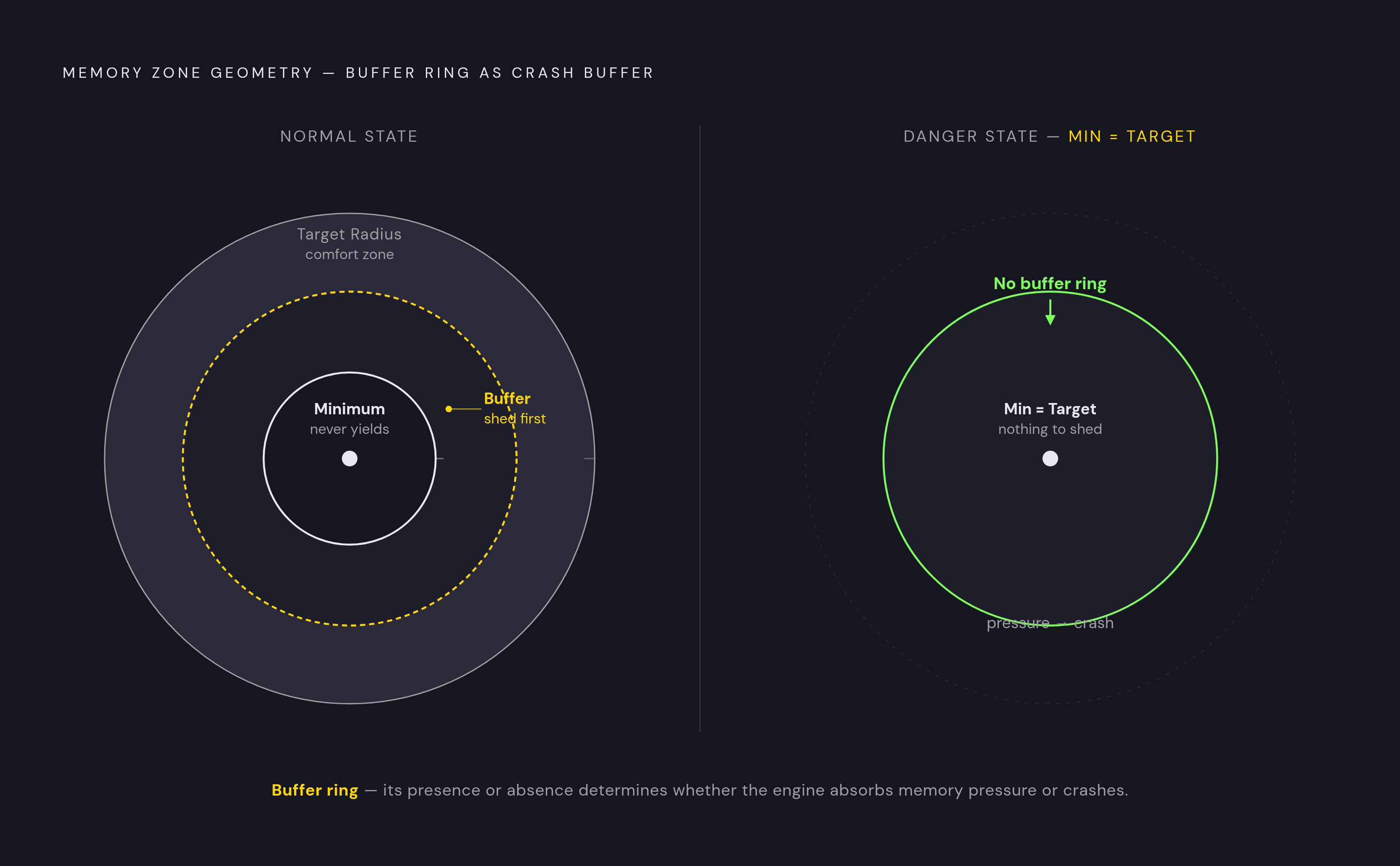
Target radius is the comfort zone. Parts inside it stream in and stay loaded as long as the client has room to spare. Minimum radius is the floor that never gives way, even when the device is dangerously low on memory. Whatever falls between those two numbers acts as a cushion. If the client starts running low on RAM, the engine clears out that cushion first, so the minimum radius never gets touched.
Setting both radii to the same number makes that cushion disappear. When memory gets tight, there's nothing left to trim, so the engine either keeps everything and risks an out-of-memory crash, or it cuts into territory you meant to protect. Either way, you'll see longer network pauses or a rougher experience for the player, because you removed the one buffer designed to absorb the pressure gracefully.
The engine does not look at your frame rate when making streaming decisions. It reads memory, not graphics card strain. Crank up the target radius on a device with a weak GPU, and frame rate will tank anyway, because streaming was never the thing protecting your FPS. That confusion between "feels laggy" and "running low on memory" trips people up constantly, and it matters once StreamOutBehavior enters the picture later.
What happens when minimum radius is set too large
Pushing minimum radius as high as possible sounds safe: you get more guaranteed world and less risk of pop-in. It isn't safe. It forces the server to hold a bigger chunk of the world in memory at all times, for every player, all the time, and past a certain point that starts to choke replication across the board.
A documented engine bug report lays out the mechanism. A team bumped StreamingMinRadius from a moderate setting up to a large one, and suddenly any freshly spawned object, a car being the example on record, took dramatically longer to replicate. This wasn't a car spawning somewhere far off and taking its time to load. The car was sitting right next to the player, and it still crawled in late.
The reason traces back to what the server is juggling. It has to keep that minimum radius fully loaded in memory for everyone, and when that radius gets too big, the cost of maintaining it eats into the budget for everything else, including basic replication of new objects. Developers on the forum point out that if you stretch minimum radius too far, you work against the whole point of streaming, because the system exists to lighten the server's memory load, not add to it permanently. Community guidance settles on a rough ceiling: keep minimum radius below that threshold wherever you can. Official documentation backs this up directly, warning that raising the default "will require more memory and more server bandwidth at the expense of other components." Setting it high because it feels generous costs you replication speed everywhere else in the game.
How StreamOutBehavior mode shifts the memory-vs-visual tradeoff
StreamOutBehavior decides how aggressively the engine enforces your target radius, but that choice reaches further than memory charts do. It shapes what players actually see on screen.
LowMemory is the default setting, and it's the cautious option. The client only clears out space beyond the minimum radius when memory pressure appears, so anything sitting between minimum and target stays loaded as long as the device can afford to keep it. Opportunistic takes the opposite approach. It aggressively clears content beyond the target radius even when there's no memory pressure at all, cutting memory use and lowering the odds of an out-of-memory crash.
That aggression has a cost, and it isn't hypothetical. MicroProfiler logs from one documented case showed the "Mega Replicator" replication system, working alongside a Replicator GC Job, triggering avatar-related scripts mid garbage-collection cycle. So you get limb flicker, because characters' arms and legs stutter while the engine is garbage-collecting and the avatar script is mid-task. That's the Opportunistic tradeoff in action: fewer crashes, more visual hiccups.
There's a third setting worth a quick mention, PredictiveStreamingMode. It tries to get ahead of the player by preloading places they're likely to need soon, a respawn point, an area they just left via a CFrame jump. These predictions don't replace the core radius logic, they add to it, expire quickly if nothing uses them, and get skipped automatically on devices that can't spare the resources.
Where streaming breaks client-side scripts
Radius settings aren't just a performance knob. They reach straight into your code, so if a client script assumes an object exists, it will fail the moment streaming proves that assumption wrong. They are predictable results of how radius and streaming interact, and they appear whenever a game has real players scattered across a real map.
Start with remote events. If the server creates a part and immediately passes it to a client through a remote event, that client can receive nil instead of the object, simply because the part hasn't replicated to them yet. The client isn't broken, it's just outside streaming range for that particular piece of the world at that particular moment.
Spectator cameras run into a similar wall. If you watch another player from across the map, you're watching objects that can sit well outside your own streaming radius, and they won't load for you as the spectator unless you step in. So set each character model's ModelStreamingMode to Persistent, or PersistentPerPlayer, and it stays loaded no matter how far away it is. Calling Player:RequestStreamAroundAsync() at the target player's position is a useful extra step, but it's a supplement to the Persistent setting, not a replacement for it.
Constraint-heavy builds, bridges, ropes, anything held together with rods and constraints, run into a third failure. At a distance, these structures can show a "ripped-out" visual effect, because a filed bug report confirms constraints simply aren't rendered once ModelLOD kicks in. The practical fix is swapping rope visuals for actual mesh geometry instead of relying on constraint rendering to hold up at range.
All three of these point back to the same lesson from the radius sections above: the settings you choose for target radius, minimum radius, and stream-out mode decide not just how smooth the game feels, but whether your scripts can trust that the objects they're reaching for actually exist.
Terrain's immunity to streaming rules
Terrain plays by its own rules, and radius settings don't apply to it the way they apply to BaseParts. That means large terrain maps carry a memory cost that no amount of radius tuning will shrink, as long as the hardware running the game can handle it.
Developers on sprawling terrain-based maps have reported that terrain sitting way outside the configured streaming radius stays fully visible anyway, even with StreamingEnabled on the entire time. The engine only culls loaded terrain when the device itself is struggling to keep up. On a capable machine, terrain renders no matter what radius number you set in the Workspace properties.
This isn't a bug sneaking past the system, it's a direct result of how the engine prioritizes hardware capability over configured limits: if a device can render something far away, it will, radius setting or not. So if terrain makes up a big share of your map, radius settings that look like they're working perfectly for parts can quietly give you a false sense of total memory control. Streaming alone isn't enough of a memory strategy in that case. So you end up choosing between terrain and mesh parts, not setting a radius number in a properties panel.
What streaming cannot do at runtime
Every StreamingEnabled property gets locked in through Studio, before the game ever goes live, and none of it can be changed by a script once players are in session. That's a structural limit, not a workaround waiting to be discovered. So you can't adjust streaming behavior on the fly if a player's network conditions change, if a device suddenly runs low on memory, or if any other mid-session shift happens.
Official documentation states this directly: streaming properties are non-scriptable, full stop, and have to be set on the Workspace object inside Studio. A developer forum thread from 2024 lays out the same boundary. Client memory is the one factor that dynamically shifts streaming radius behavior during a session, and Opportunistic stream-out mode along with predictive streaming signals add their own influence too, but you still have no switch you can flip mid-session to adjust the radius directly.
Developers have asked for finer control more than once. One request on record: the ability to set a different loading distance for individual objects, so one tree streams in close while another holds back farther out. That request remains unimplemented as a native property. The forum has also pushed for network latency to factor into the Opportunistic setting, and for the broader ability to adjust streaming properties mid-session, and neither has landed either. The workaround for per-object control is building a custom instance replication system by hand, which is a serious undertaking, so the forum's own advice is to limit that effort to only the handful of instances that genuinely need it. On top of all that, StreamingEnabled gives you no built-in analytics, so there's no dashboard telling you how much memory or bandwidth your streaming settings are actually costing. You tune radius values by testing and watching, not by reading them off a chart.
A practical framework for choosing radius values given these tradeoffs
Every piece covered above, memory, replication speed, visual quality, script reliability, terrain, feeds into the same set of radius decisions, and none of it can be adjusted after launch. That makes the planning stage the only stage that matters.
Start with map size. For smaller maps, the overhead of running streaming can outweigh what it saves, and the general consensus among developers is that small maps don't need it turned on. But these tradeoffs only start to bite as the world gets bigger. If you build for a larger map, don't set minimum radius equal to target radius unless you want to test what a specific distance feels like. When the values are equal, the memory buffer disappears, and the engine has no graceful way to shed load under pressure. Keep minimum radius on the conservative side too. Both the bug report on replication slowdown and the broader community guidance point to a ceiling, and once you pass it, newly spawned objects replicate slower for every player, no matter how close they stand.
Pick StreamOutBehavior based on who's actually playing your game. Opportunistic cuts crash risk for players on low-memory devices, but it can give you visible artifacts like the limb flicker described above. LowMemory, the default, is the safer call for experiences where visual polish matters more than crash prevention, since it keeps parts loaded longer and avoids the visible artifacts that come with aggressive clearing.
Before testing any of this, mark your gameplay-critical instances as Persistent. Nil reference failures and lost PrimaryParts both tie directly to radius settings, so if you test without Persistent flags set correctly, you get results that don't reflect how the game actually behaves for players.
If your map leans heavily on terrain, remember that radius settings won't touch its visibility on capable hardware. So you manage terrain's memory footprint through geometry choices, not radius numbers. And if you'd rather skip this whole configuration maze, you can let AI-assisted game creation platforms that handle scripting and structure automatically take a lot of this decision-making off your plate, so you have more room to focus on design. For anyone who wants hands-on control instead, the last and most reliable step is the simplest one: set both radii equal temporarily, a technique developers on the forum use to see what a given distance looks and feels like, before reintroducing the gap and tuning from there.